Skip to content

Smartwatch manager - #569

Open
dabear wants to merge 18 commits into
LoopKit:next-devfrom
dabear:smartwatch-manager-review
Open

dabear wants to merge 18 commits into
LoopKit:next-devfrom
dabear:smartwatch-manager-review

Conversation

@dabear

@dabear dabear commented Nov 2, 2026 •

Copy link
Copy Markdown

LoopWorkspace: watch plugins and the Pebble plugin

Adds the LupedSmartwatchKit Pebble plugin and points LoopKit and Loop at the forks until their PRs (LoopKit, Loop) are merged.

Commits

Up to date with next-dev (3aeff3b, #571), merged in 19d7098. Loop is next-dev's f161c29e (with the G7 fix, #2652) plus this PR's Loop commits (Loop #2646, which merges Loop next-dev in 917e0d27).

Commit What
115e7b3 Loop: the bluetooth-peripheral background mode, with a commented-out switch in LoopConfigOverride.xcconfig
d4f1e5d LoopKit's plugin type and Loop's host; the LupedSmartwatchKit submodule, its projects in the workspace and its plugin bundle in the LoopWorkspace scheme; elbbepTransport 0.3.59 (Swift package, tagged releases), the Bluetooth link to the Pebble
7e97b08 LoopKit, Loop and LupedSmartwatchKit: remote actions from the watch, each off by default. To turn them off without removing any commits, declare no remote capabilities: empty LupedSmartwatchManager.remoteCapabilities in the plugin (possible since 8f74dbe; named so in 20ada7f). The plugin then neither declares nor requests them, Loop hides Watch Permissions, and Luped Remote's settings and watch session are gone.
d70a554 Loop: the new strings in Loop's string catalog (265952cc, and 7c2999c5 for remote actions), so they reach translation
2210106 Loop: make clear that Add Watch is for watches other than Apple Watch
f6ac0b9 LoopKit and LupedSmartwatchKit: SmartwatchManager.delete() is async, like CGMManager and PumpManager since #570 (LoopKit #685)
ea74742 LoopKit, Loop and LupedSmartwatchKit: Luped Remote, a Pebble watchapp with remote actions (off until the user turns it on in the plugin, and each action off until allowed in Watch Permissions); bolus recommendations for carbs the watch is about to add; carb absorption from the watch; LoopKit's watch limits at 5 minutes between requests and, in any 24 hours, watch boluses up to 3 times the maximum bolus; elbbepTransport 1.1.3
e3bcb7b LoopKit, Loop and LupedSmartwatchKit: Luped Remote lists Loop's presets to start or end one, and can end a mute of alerts (a mute request of 0 ends it in LoopKit and Loop); Loop's Watch Permissions are under Third-Party Smartwatch headers, starting with what a watch other than Apple Watch can do; elbbepTransport 1.1.4
ca58869 LupedSmartwatchKit only: Find My Pebble in the plugin's Status section makes the watch buzz, beep and light up for 60 s; elbbepTransport 1.2.0. No LoopKit or Loop change, and not a remote action: it goes from the phone to the watch, so it stays when no remote capability is declared
f7156d1 LupedSmartwatchKit: Alarm Sound for watches with a speaker (Pebble Time 2): Off, Urgent Low Only or All Glucose Alarms, off by default, shown only once the watch reported a speaker; shorter texts in the plugin. Loop: shorter Watch Permissions texts, and the bolus footer lists every limit (28928727). elbbepTransport 1.3.1. No LoopKit change
19d7098 Merge of next-dev (#571: Loop, LibreTransmitter, NightscoutService and dexcom-share-client-swift); Loop points at 917e0d27, Loop #2646 with Loop next-dev merged in
332d9fa Loop: the bolus footer says the daily limit is 3 times the maximum bolus in 24 hours (16eabfc0); "3 maximum boluses a day" read as three boluses
8f74dbe LupedSmartwatchKit only: Luped Remote only while the plugin declares a remote capability. Without one, its Watch App section and its UUID in Advanced are hidden, a saved Luped Remote switch is ignored, and its watch session is never opened (no Bluetooth service for it).
20ada7f LupedSmartwatchKit only: the constant listing the plugin's remote capabilities is now remoteCapabilities (was remoteActions), in LoopKit's capability terms. No change in behaviour
a2332f8 LupedSmartwatchKit only: Luped Remote is offered while remoteCapabilities isn't empty; the plugin no longer keeps its own copy of LoopKit's remote capabilities. No change in behaviour
ece3842 LupedSmartwatchKit and elbbepTransport 1.4.0: until the watch has reported a speaker, the plugin asks the watchface (COMMAND speaker, once per session), so Alarm Sound shows without restarting the watchface, for example after the watch was added again. No LoopKit or Loop change
c6edfac LupedSmartwatchKit and elbbepTransport 1.4.1: while a reading waits for the loop result (or its dose), the plugin holds an iOS background task, so iOS can't suspend Loop before the reading has gone to the watch. Before, a suspended Loop held it until the app was opened again. No LoopKit or Loop change
a9e93df Loop: a watch bolus that reached the pump counts for the 5 minutes between watch boluses even when the pump reports a failure, which can be uncertain; only a delivered one counts toward the daily total (818c02f8)

Add a SmartwatchManager plugin type, with a Pebble plugin

Watches can now ship as plugins, like CGMs and pumps, instead of as code inside Loop. They appear under Settings → Devices → Add Watch and write to the device log. The first plugin, LupedSmartwatchKit, shows Loop's glucose, loop status and glucose alerts on a Pebble running the Luped CGM watchface.

Supported watches: Core Devices' Pebble Time 2 and Pebble Round 2. The watchface is built for those two platforms only (emery, gabbro). Older Pebbles, Apple Watch and Garmin aren't part of this PR; Apple Watch keeps Loop's existing app. Daily use is on a Time 2.

Using it: for people with diabetes and caregivers

This section is for the person wearing the watch, or a family member. It explains what the watch does; it isn't medical advice. Talk to your care team about your alert settings.

What it does: your Pebble shows the glucose Loop sees, and buzzes when Loop raises a glucose alert. It's an extra screen on your wrist: your iPhone still alarms as before. The watchface itself can't give insulin or enter carbs; the optional Luped Remote app below can, only if you turn it on and allow each action in Loop.

What you need:

  • a Pebble Time 2 or Pebble Round 2, paired in the Pebble app on the same iPhone as Loop;
  • the free Luped CGM watchface from the Pebble app's store, set as your watchface;
  • a Loop build that includes this change. Until it's part of a Loop release, that means building Loop yourself from these branches (how).

Setting it up: in Loop, go to Settings → Devices → Add Watch → Pebble and follow the steps. Add Watch is for watches other than Apple Watch: Loop's Apple Watch app needs no setup there, and is installed from the Watch app on your iPhone. Loop shows when it is waiting for the watch, when the watch is connected, and when the watch has received your first reading. If the watch is added in another diabetes app, remove it there first: the watch follows one app at a time.

On the watch:

  • your glucose, its trend arrow and the change since the last reading, with a graph of the last hours or, with the Large Glucose layout, just a big number;
  • a status line you choose, such as IOB and COB (insulin and carbs still active in your body);
  • a ring that shows when Loop last ran;
  • the ring turns red during a low or urgent low and amber during a high, and the watch buzzes each time Loop alerts. While Loop's alerts are muted, the watch neither buzzes nor changes colour, so a normal-looking ring doesn't mean there is no alert: check your iPhone.

When something is wrong:

  • ERR instead of a number: the watch has had no new reading for 15 minutes. It buzzes once when this starts.
  • A blue Bluetooth symbol: the watch isn't connected to your iPhone. It catches up when it reconnects.
  • "Waiting for CGM": Loop has no glucose to send yet.
  • A message asking you to restart the watchface: a different app on the phone started sending data. Restart the watchface, and keep the watch in one app.

Always check Loop on your iPhone, or your CGM, before acting on what the watch shows, especially when it shows ERR or the Bluetooth symbol.

Settings (Settings → Devices → Pebble): Layout, Status Line and Last Loop; Watch Alarms, which turns the buzz on or off (the ring still changes colour); Alarm Sound on a Pebble Time 2, off unless you choose Urgent Low Only or All Glucose Alarms: the watch then beeps as well as buzzes, at its own speaker volume, and Quiet Time on the watch may silence the beep; Send Now; Find My Pebble, which makes the watch buzz, beep (Pebble Time 2, at the watch's speaker volume) and light up for a minute, until you press any button on it; Diagnostics, with the watch's battery and a message log for troubleshooting; and Delete Pebble.

Luped Remote (optional): a separate watch app for asking Loop to do things from the watch's buttons: mute alerts (or end the mute), add carbs, start or end a preset, and a bolus.

  • Getting it: install Luped Remote on the watch from the Pebble app's store, then turn it on in Loop under Settings → Devices → Pebble → Watch App (that section links to it in the store). It is off until you do.
  • Allowing actions: each action is also off in Loop until you allow it under Settings → Third-Party Smartwatch → Watch Permissions, which starts by explaining what a watch other than Apple Watch can do. Loop checks every request again, with its own limits for requests from a watch (below).
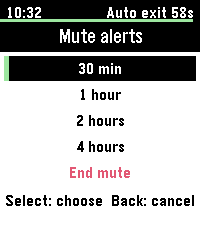
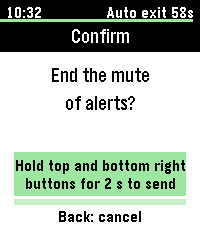
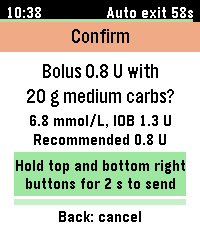
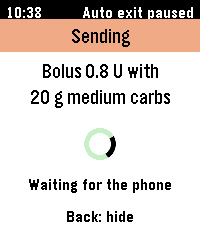
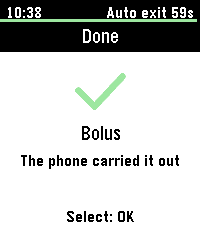
  • Using it: pick the action and the amount; for carbs, also how fast they are absorbed (fast, medium or slow). For a bolus you first say which carbs go with it (or none); the bolus then starts at Loop's recommendation for them, and a bolus over that recommendation is refused. Presets lists your presets from Loop, to start one or end the running one. Mute alerts offers Loop's mute times (30 minutes, 1, 2 or 4 hours) and End mute. To send, hold the top and bottom right buttons for 2 seconds. The watch shows whether Loop did it, and why not when it didn't.
  • Limits: at most one bolus and one carb entry from the watch every 5 minutes, and boluses from the watch in any 24 hours adding up to at most three times your maximum bolus.

Check Loop on your iPhone before and after asking for a bolus from the watch. This isn't medical advice: decide with your care team whether to allow boluses from a watch.

Screenshots

From an iPhone with a Pebble Time 2 running Luped CGM, on this PR's branches; the Add Watch picker is from my personal build (see below), and the watch photos, the Large Glucose layout and Diagnostics are from earlier builds, unchanged since. The phone is set to Norwegian, so Loop's existing labels are Norwegian; the new texts have no translations yet. Luped Remote on the watch: screenshots in this comment.

The watch

Graph layout Large Glucose layout
Watch, Graph layout: glucose ring, IOB and COB, last loop, history graph Watch, Large Glucose layout

Adding a watch

No watch yet Add Watch Before you start Set up
Settings, Devices: Add Watch, Tap here to set up a watch other than Apple Watch Add Watch picker: Pebble Time 2 and Pebble Round 2, Garmin coming soon, and the note that Apple Watch is not added here Setup: what Loop sends to the Pebble, and four steps before you start Setup done: Loop ready, watch connected, reading shown on the watch

Next, not in this PR: a second plugin, GarminSmartwatchKit, built on the same plugin type from Trio's GarminManager (display only). My personal build lists it as coming soon and doesn't load it; the Add Watch screenshot above is from that build.

Third-party smartwatch

Settings → Devices Watch Permissions
Settings, Devices with the Pebble row, and the Third-Party Smartwatch section with Watch Permissions Watch Permissions: What Non-Apple Watches Can Do, then the four toggles under Third-Party Smartwatch Permissions with their limits

Pebble settings

Status and display Alarms and Watch App Alarm Sound Luped Remote off
Pebble settings: connected, last reading, delivered, round trip, Send Now, Find My Pebble, and the display settings Watch Alarms, Alarm Sound, Luped Remote on with its status, Diagnostics, Advanced, Delete Pebble Alarm Sound menu: Off, Urgent Low Only, All Glucose Alarms Luped Remote off: the link to get it from the Pebble app store, and what it does
Large Glucose Advanced Delete
Layout set to Large Glucose Advanced: the watchface and Luped Remote UUIDs Delete confirmation

Diagnostics

Watch info Communication log (also in Loop's device log)
Diagnostics: watch info Communication log with a decoded DATA message

Branches

All are named smartwatch-manager-review and sit on what LoopWorkspace next-dev pins (Loop on f161c29e plus its commits, see Loop #2646). The table sorts each repo's commits into the plugin type (display and alerts) and remote actions (requests from the watch, off by default); in each branch's history the two are interleaved. Declaring no remote capabilities in the plugin (an empty remoteCapabilities) turns the remote actions off. d4f1e5d, the last workspace commit before them, builds and passes its tests.

Repo Plugin type: display and alerts Remote actions
LoopKit #684 e2ae8f62; 826587db (async delete()) 9e88151c, 6226ba82 (recommendations), 8616e7b5 (absorption, limits), e2524741 (a mute of 0 ends the mute)
Loop #2646 768106b3 (background mode), 48bc6d4e, 265952cc (strings), f532d3d2; 917e0d27 (merge of Loop next-dev) 5adc79cc, 7c2999c5 (strings), 021f6e40 (recommendations), 73e89c6b (absorption), be083470 (end mute), e539d380 (Third-Party Smartwatch headers), 28928727 (shorter texts), 16eabfc0 (daily limit wording), 818c02f8 (a failed watch bolus counts for the 5 minutes)
LupedSmartwatchKit 60176ac; f84aa68 (async delete()); 3cef80e (README); 3b29d0d (Find My Pebble), 908c45e (Alarm Sound, shorter texts), dd07b24 (Alarm Sound without restarting the watchface), b9935c6 (background task while a reading waits) d66e597; Luped Remote 0c32603…ba4b825; 0bf0a1a, 44f6276, 44308aa (Luped Remote only with a remote capability declared)
LoopWorkspace (this PR) 115e7b3, d4f1e5d; f6ac0b9 (async delete()); 2210106; ca58869, f7156d1; 19d7098 (merge of next-dev); ece3842, c6edfac 7e97b08, ea74742, e3bcb7b, 332d9fa, 8f74dbe, 20ada7f, a2332f8, a9e93df; d70a554 pins Loop's strings commits

Related branches (no PR needed):

Repo Branch What
elbbepTransport tag 1.4.1 e296b805 The Bluetooth link to the Pebble, a Swift package used by the plugin
LupedPebbleWatchFace main d588b08: Luped 0.1.26, Luped Remote 0.1.8 The Luped CGM watchface and the Luped Remote watchapp, both in the Pebble app store (Luped CGM, Luped Remote)

Not in this PR, for reference:

Repo Branch What
GarminSmartwatchKit main 51e69cff Garmin as a watch plugin (the "coming soon" screenshot), experimental
Trio #1745 dabear/Trio smartwatch-manager 89863359 Trio dev hosting the same plugins, on this PR's LoopKit (e2524741)
dabear/Trio experimental/garmin-plugin-from-dev 6163db28 Trio with Garmin as a plugin, experimental

Dependencies

  • Until the LoopKit and Loop PRs are merged, LoopWorkspace points those submodules at the forks.
  • New in LoopWorkspace: the LupedSmartwatchKit submodule (iOS 17.6, like Loop), and through it elbbepTransport 1.4.1, a Swift package with tagged releases. It uses only Apple frameworks (CoreBluetooth, CryptoKit and Combine), has no third-party dependencies, and is MIT licensed, like the plugin.
  • On the phone: the Pebble app pairs the watch. Loop talks to the watchface directly over Bluetooth (PPoGATT), with no PebbleKit JS and no phone-side Pebble SDK.
  • LoopKit and Loop get no new dependencies.
  • Names: Luped is the watchface and plugin, elbbepTransport ("Pebble" backwards) the Bluetooth link, LoopPebble my Loop fork.

Why a new plugin type

  • Service has no device log, has no channel for the display unit or alerts, uploads incrementally from an anchor, and lives under Services.
  • StatefulPluggable has no UI, settings row or data delegate.
  • A watch is a device: like a CGM or pump it saves its state in rawState, logs to the device log and belongs under Devices. SmartwatchManager follows that model, shaped like Loop's Apple Watch contract (glucose, unit, prediction, loop state) plus host-issued alerts, because watches without iOS notification mirroring can't otherwise know when Loop alerts.

LoopKit: the protocols

SmartwatchManager.swift imports only Foundation and uses no other LoopKit type, so the same plugin can build against other apps' LoopKit forks too. Every method is documented: when it is called, on which thread, and what the other side does.

public protocol SmartwatchManager: AnyObject {          // the plugin
    init?(rawState: RawStateValue); var rawState: RawStateValue { get }
    var pluginIdentifier: String { get }
    var smartwatchManagerDelegate: SmartwatchManagerDelegate? { get set }
    static var capabilities: SmartwatchCapabilities { get }   // what it can use
    var requestedCapabilities: SmartwatchCapabilities { get } // what it wants now
    @MainActor func watchDataDidUpdate(_ snapshot: SmartwatchStatusSnapshot)
    @MainActor func watchAlertDidIssue(_ alert: SmartwatchAlert)                  // .alerts
    @MainActor func watchAlertDidRetract(_ identifier: SmartwatchAlertIdentifier) // .alerts
    @MainActor func watchHostDidLog(_ message: String)        // host notes for the plugin's log
    @MainActor func watchHostDidReceiveURL(_ url: URL) -> Bool // companion-app callbacks
    func delete() async                               // like CGMManager and PumpManager
    var remoteActionLimits: SmartwatchRemoteActionLimits { get }  // remote actions commit
}

public protocol SmartwatchManagerDelegate: AnyObject {  // the host: Loop's DeviceDataManager
    func smartwatchManagerDidUpdateState(_ manager: SmartwatchManager)
    func smartwatchManagerWantsDeletion(_ manager: SmartwatchManager) async
    func smartwatchManagerRequestsRefresh(_ manager: SmartwatchManager)
    func smartwatchManager(_ manager: SmartwatchManager, didLogEvent event: SmartwatchDeviceLogEntry)
    func smartwatchManager(_ manager: SmartwatchManager, issueDeviceAlert alert: SmartwatchDeviceAlert)
    func smartwatchManager(_ manager: SmartwatchManager, retractDeviceAlert identifier: SmartwatchAlertIdentifier)
    // Remote actions commit: each refuses by default, so a host implements only what it supports.
    func smartwatchManager(_:requestBolus:) async throws -> Double
    func smartwatchManager(_:recommendBolusFor:) async throws -> SmartwatchBolusRecommendation  // a question before a bolus: nothing is added
    func smartwatchManager(_:requestCarbEntry:) async throws -> Double
    func smartwatchManager(_:requestAlertMute:) async throws -> Date   // 0 ends the mute
    func smartwatchManager(_:requestOverride:) async throws
    func smartwatchManager(_:requestTempTarget:) async throws    // hosts with temp targets (Loop refuses)
}
  • Capabilities: glucose, history, prediction, loopStatus (IOB, COB, last loop, closed loop), therapy (basal, ISF, eventual glucose, sensitivity ratio, correction range, active preset) and alerts. The remote actions commit adds remoteBolus, remoteCarbs, remoteMute, remoteOverride and remoteTempTarget. The host acts only on effectiveCapabilities (declared ∩ requested), so a plugin can't get what it didn't declare.
  • Remote action requests (SmartwatchRemoteActions.swift): SmartwatchBolusRequest (units, the snapshot's context token, when the user confirmed it, isForced), SmartwatchCarbEntryRequest (grams, when confirmed, and an optional SmartwatchCarbAbsorption: fast, medium or slow, which the host maps to its own absorption times), SmartwatchAlertMuteRequest (a duration; 0 ends the host's mute), the preset requests, and SmartwatchBolusRecommendationRequest (grams about to be added, 0 for none, and their absorption), answered with a SmartwatchBolusRecommendation (units, the carbs counted, maximum bolus). Each request refuses with its own error (SmartwatchBolusError, …), which the plugin can pass back to the watch as a reason.
  • SmartwatchStatusSnapshot holds plain mg/dL values. The host fills only what the plugin asks for.
  • SmartwatchAlert carries glucoseAlertType (urgentLow, low, high, predictedLow, or nil). Each app names its alerts differently, so the host maps its own, and a watch can colour a low and a high differently without thresholds of its own.
  • Device alerts are about the watch itself, such as a missing companion app. They are at most time-sensitive; glucose alerts come only from the host.
  • UI: SmartwatchManagerUI, SmartwatchManagerUIPlugin and the bundle keys, as for CGM and pump plugins.

Loop: the host

  • PluginManager finds watch plugins. DeviceDataManager keeps one watch manager, saved as SmartwatchManagerState and kept if a build lacks the plugin. Settings → Devices gets a Watch row: Add Watch, a picker, the plugin's setup and settings.
  • SmartwatchManagerHost sends a snapshot as soon as a reading is stored and again when the loop's output changes, without resending unchanged ones; its display unit is HealthKit's preferred glucose unit (the values themselves are in mg/dL). The Apple Watch path is untouched.
  • Alerts: a new AlertForwarder hook on AlertManager passes Loop's immediate, unmuted glucose alerts and their retractions to the plugin.
    • The watch follows Loop's mute, critical alerts included.
    • Test alerts show on the watch and clear after 30 s.
    • Alarms that are off in the active profile, or all of them while the CGM raises its own, are cleared on the watch.
    • Each alert that isn't forwarded is logged with the reason.
  • Remote actions (Settings → Third-Party Smartwatch → Watch Permissions, each off by default; the screen starts with what a watch other than Apple Watch can do): Loop checks each request with LoopKit's rules, then uses its existing remote paths: the remote bolus path for boluses, remote carbs (with the watch's absorption as Loop's carb-entry fast, medium or slow time) and overrides through theirs, and Loop's alert mute (a mute request of 0 unmutes). A bolus recommendation is answered like the Apple Watch's: recommendManualBolus with the carbs as the entry they would become, rounded as the bolus check rounds the recommendation it caps at, only while watch boluses are allowed and glucose is recent.
  • Background mode: a plugin bundle can't declare background modes, so Loop/Info.plist lists bluetooth-peripheral under #if LOOP_BLUETOOTH_PERIPHERAL, through Info.plist preprocessing set in Loop.xcconfig. Clearing INFOPLIST_PREPROCESSOR_DEFINITIONS leaves it out. The built Info.plist is otherwise unchanged, and the mode does nothing unless a plugin publishes a Bluetooth service.

The Pebble plugin

  • LupedSmartwatchKit, laid out like G7SensorKit:
    • LupedSmartwatchKit: the manager;
    • LupedSmartwatchKitUI: setup and settings;
    • LupedSmartwatchPlugin: the .loopplugin.
  • It declares glucose, history, alerts, loopStatus and therapy, and requests only what the chosen display needs. For Luped Remote it also declares remoteMute, remoteCarbs, remoteBolus, remoteOverride and remoteTempTarget; each stays off until the user allows it in Loop's Watch Permissions.
  • Luped Remote (Watch App settings): shown only while the plugin declares a remote capability (otherwise hidden, and its watch session never opens); off until turned on; while off, the section links to it in the Pebble app store. Its status says whether the watch is running it, has run it, or hasn't yet: the watch opens Luped Remote's session whether or not it is installed, so the plugin never calls that "Connected".
  • Setup: a requirements checklist, then live progress until the watch acknowledges a reading.
  • Settings:
    • layout (Graph or Large Glucose), status line and last loop;
    • Watch Alarms, and Alarm Sound (off by default) once the watch has reported a speaker, with a note while the watch is in Quiet Time;
    • Find My Pebble and Stop Finding, with a short note: the watch is buzzing, open Luped on the watch, or no answer;
    • Diagnostics: the watch's battery and counters, and a decoded communication log, which also goes to Loop's device log.
  • The watch colours its ring from Loop's active glucose alert and buzzes each time Loop fires or repeats one. It has no thresholds of its own, so it follows Loop's alert settings, including Delay 1st Alert for highs.
  • Messages: one per reading, sent once the loop's dose is stored (at most 10 s after the reading when the loop is slow); an alarm's reading goes at once. While a reading waits, the plugin holds an iOS background task, so the wait ends even with Loop in the background. Details, and how the watch's requests are signed, are in the plugin README.

How the link works alongside the Pebble app

Loop doesn't replace the Pebble app; it adds its own channel to the watch, used only by the Luped apps: the watchface, and Luped Remote when it is on (elbbepTransport).

  1. The Pebble app owns the watch: pairing, the connection (encrypted with LE Secure Connections), notifications, the app store and updates. Loop never pairs or connects to the watch itself.
  2. Loop publishes its own PPoGATT service ("Pebble Protocol over GATT") on the iPhone, as the Pebble app does. The phone hosts the service and the watch connects to it as the client.
  3. The watch finds it on its existing connection, reads which watch app it is for (Luped's app UUID) and opens a separate app session for it, next to the Pebble app's own system session.
  4. Each session starts with a reset handshake; Loop then tells the watch it accepts 8 KB messages (otherwise 144 bytes).
  5. Loop and the watchface exchange AppMessages only: DATA, Find My Pebble and the speaker question from Loop, acknowledged by the watch (rejected while Luped isn't the running watchface), and refresh requests, hourly diagnostics and speaker reports from the watch. elbbepTransport handles sequencing, retransmission and resets.
  6. With Luped Remote turned on (and a remote capability declared), Loop publishes a second PPoGATT service for its app UUID, and the watch opens a session for it too. The watch runs one app at a time, so Loop sends to the app that last started or sent something, and to the other after the first rejects a message.

What follows from this:

  • No PebbleKit and no Pebble SDK on the phone. The old PebbleKit iOS SDK doesn't recognise Core Devices watches.
  • Loop needs the bluetooth-peripheral background mode to keep its service up in the background.
  • One diabetes app at a time: two apps would publish the same service for the same watchface, and the watch follows whichever it connects to. Setup asks the user to remove the watch from other diabetes apps.
  • Loop's session can do only what PebbleOS allows third-party apps; system functions such as app logs stay with the Pebble app.
  • When the watch is out of range or the Pebble app isn't connected, Loop's link waits and sends the latest reading when the watch is back.

Remote actions: the gates

A request from the watch reaches Loop's dosing only if it passes every gate:

  1. The plugin declares the capability (remoteBolus, …). Otherwise the host never receives the request. The Pebble plugin declares the five for Luped Remote, which itself is off until turned on: while it is off, no request can arrive.
  2. The plugin authenticates the request and passes each one on once. The Pebble plugin, for example, only accepts boluses signed on the watch with a per-session key; see its README.
  3. The user allows it in Loop: Settings → Third-Party Smartwatch → Watch Permissions has a toggle per action, off by default. The screen shows only when the plugin declares a remote capability, and every toggle turns off when the watch is removed or replaced.
  4. LoopKit's shared, tested rules (SmartwatchRemoteActionPolicy.swift):
    • every request: confirmed on the watch at most 30 s ago, and the watch's clock no more than 5 s ahead;
    • bolus:
      • the context token from the latest snapshot, at most 15 min old;
      • a glucose reading in the last 15 min;
      • at most the maximum bolus, and at most the recommendation unless the user forced it;
      • one watch bolus per 5 min, at most 3 × the maximum bolus per 24 h;
      • a resend of a bolus still being delivered gets inProgress, not a second bolus;
    • carbs: at most Loop's maximum carb entry, one entry per 5 min (a request expires after 30 s, so a resent one can't add twice), dated when the user confirmed them on the watch;
    • bolus recommendation (a question before a bolus, nothing added or delivered): only while boluses from the watch are allowed and glucose is recent, for carbs that would be a valid entry.
    • A plugin may declare its own limits (remoteActionLimits), for example a longer window for a watch app that can't send a token back. Loop's own checks below still apply.
  5. Loop's existing remote paths: the bolus goes through the remote bolus path (maximum bolus check, notification, upload), carbs and overrides through theirs, and mute through Loop's alert mute, which a mute request of 0 ends. Temp targets are refused.

What the watch can and can't do:

  • The watchface sends no remote actions. Watchfaces get no button presses on PebbleOS, and can't confirm anything well.
  • Luped Remote, a separate watchapp with buttons, sends them. Each request is confirmed on the watch by holding the top and bottom right buttons for 2 seconds; a bolus is signed with the session key and first shows Loop's recommendation for the chosen carbs. It never sends a forced bolus, so a bolus over Loop's recommendation is refused.
  • Everything is off by default: Luped Remote in the plugin, and each action in Loop's Watch Permissions.

Protocol: watch and phone

Messages between the Luped apps and the plugin (PROTOCOL.md); added for Luped Remote, Find My Pebble and the alarm sound:

  • Requests (COMMAND, each ending @<confirmedAt>): mute:<minutes> or mute:cancel (passed to the host as 0, which ends the mute), carbs:<grams>[:<absorption>], override:<preset id> or override:cancel, temptarget:<preset id> or temptarget:cancel (hosts with temp targets), and signedbolus:<units>[:<grams>[:<absorption>]]@<confirmedAt>#<sid>.<seq>.<mac>. absorption is fast, medium or slow; the host maps it to its own absorption times, and older requests without it mean the host's default.
  • Signature: HMAC-SHA256 with the per-session key, over v1|<sid>|<seq>|<confirmedAt>|<action>|<units>|<grams>, then |<absorption> only when the request has one, so older requests verify as before.
  • Recommendation: COMMAND recommend:<grams>[:<absorption>] (0 g for none) is answered on a new key, RECOMMEND, to Luped Remote only: <grams>:ok:<units>:<maximum bolus>, or <grams>:<outcome>[:<reason>]: refused when boluses from the watch aren't allowed or glucose isn't recent, ignored from a host without recommendations, failed for an invalid amount.
  • Presets: COMMAND presets is answered on a new key, PRESETS, to Luped Remote only: [overrides, temp targets], each a list of [id, name, running] or null for a kind the host doesn't have (Loop: temp targets). Names are cleaned for the watch's fonts (no emoji or control characters, at most 32 characters), an id that isn't 1–64 letters, digits, ., _ or - goes as a short ~ token that the plugin maps back, and at most 16 of each kind are sent. DATA is unchanged.
  • Find My Pebble (phone to watch, Luped 0.1.24 and Luped Remote 0.1.6): COMMAND findpebble:<seconds> (the plugin sends 60; findpebble:0 stops it) to whichever app is running, and to the other one if the watch rejects it. The watch shows a full screen with the light on, buzzes back to back and beeps every 2.5 s where it has a speaker, until the time is up or any button is pressed. It doesn't answer; the message's ACK says it arrived. Older watches ignore it, as they ignore any COMMAND they don't know.
  • Alarm sound (Luped 0.1.25 and Luped Remote 0.1.7): a watch with a speaker sends COMMAND speaker:on, or speaker:quiet while its Quiet Time is on, after its startup refresh and when Quiet Time changes; watches without one never do. Until a report has arrived, the plugin asks with COMMAND speaker, once per watchface session after it takes a reading, so a watch added again while its watchface kept running still reports (Luped 0.1.26 and Luped Remote 0.1.8 answer; older ones ignore it). To sound an alarm too, the plugin sends its alert event (DATA index 9) negative, decided once per alert; older watches only compare that value, so no new index or command. The watch never beeps without buzzing, nor while index 8 isn't above 0.
  • Answers (RESULT): <action>:<outcome>[:<reason>], e.g. carbs:refused:too soon; watches read the first two fields. A bolus with carbs is answered twice, carbs first.
  • Sessions: one per app UUID (the Luped watchface's, and Luped Remote's while it is on and a remote capability is declared). The watch keeps both open and runs one app at a time; only a message from Luped Remote shows it is installed.

Questions for reviewers

  1. Background mode on by default. It's harmless without a watch plugin, and DIY builders get watch support without editing anything. Would you rather have it off in Loop and turned on in LoopWorkspace's LoopConfigOverride.xcconfig? This is to be compatible with (or not get in the way of) Tidepool Loop which may or may not want to have this background mode enabled.
  2. Remote actions: keep them, turn them off in the plugin (no remote capabilities declared: the LoopKit and Loop code stays, unused), or revert the remote actions commits so this PR is display and alerts only?
  3. Watch limits: LoopKit's defaults are 5 minutes between watch boluses and between carb entries from the watch, and watch boluses in any 24 hours adding up to at most 3 times the maximum bolus (a total in units, not a count). The Apple Watch path only has a 30-second expiry. A plugin can declare its own limits, looser as well as stricter; Loop applies them as declared. Are these defaults right, is the daily total needed at all (every watch bolus is already capped by the recommendation, which counts insulin on board), and should Loop treat the defaults as a floor that plugins can only tighten?
  4. Repositories: I'm happy to move LupedSmartwatchKit, elbbepTransport and the Luped watchface to the LoopKit organization, or another org you prefer.

Bjørn Inge and others added 6 commits November 5, 2026 09:15
Watch plugins that publish a Bluetooth service need the bluetooth-peripheral background mode. It is on by default; uncommenting INFOPLIST_PREPROCESSOR_DEFINITIONS in LoopConfigOverride.xcconfig leaves it out. Loop points at the fork until its PR is merged.
LoopKit's SmartwatchManager plugin type and Loop's host, with the LupedSmartwatchKit submodule, its projects in the workspace and its plugin bundle in the LoopWorkspace scheme. elbbepTransport (Swift package, tagged releases) is the Bluetooth link to the Pebble. LoopKit and Loop point at the forks until their PRs are merged.
Bolus, carbs, alert mute and presets requested from the watch, each refused unless the plugin declares it and the user allows it in Watch Permissions. The Pebble plugin declares none yet. Revert this commit (and the matching commit in LoopKit, Loop and LupedSmartwatchKit) to leave remote actions out.
The base strings (47e7c4ab) and the remote action strings (647c0dd4), so they reach translation. To leave remote actions out, revert 647c0dd4 together with e3425e1d in Loop.
…async

Like CGMManager and PumpManager since LoopKit #685: the plugin's delete() stops its work and awaits the host's removal, replacing delete(completion:) and notifyDelegateOfDeletion.
@dabear
dabear force-pushed the smartwatch-manager-review branch from 4243102 to f6ac0b9 Compare November 5, 2026 08:43
@dabear

dabear commented Nov 5, 2026

Copy link
Copy Markdown
Author

Force-pushed 4243102 → f6ac0b9 so the branch builds only on what next-dev pins: six commits on next-dev (1321af1), no merges.

  • Loop now points at its review branch on 29928c1c (the Loop next-dev pins) instead of a commit after Loop #2645, so a clean build works again. #2645 removed the Watch app's G7SensorKit framework reference; the fix is in Loop #2652.
  • The Bump submodules to decouple LoopKit and LoopAlgorithm #568 merge is gone, since next-dev has it, and the async delete() bump is its own commit (f6ac0b9).
  • From a clean build: 432 LoopTests pass at the head, 431 without remote actions (d4f1e5d).

@dabear
dabear marked this pull request as draft November 5, 2026 11:46
@dabear

dabear commented Nov 5, 2026

Copy link
Copy Markdown
Author

Adding some more remote control options at the moment, marking it as draft because of this

Bjørn Inge Berg added 9 commits November 5, 2026 13:43
…endations, carb absorption (elbbepTransport 1.1.3)

- LupedSmartwatchKit serves Luped Remote, a Pebble watchapp with remote actions (off until turned on in the plugin; the store link is in its settings), and declares the remote actions it sends. The host's Watch Permissions, all off by default, still decide each one.
- LoopKit and Loop: a watch can ask for Loop's bolus recommendation for carbs it is about to add, and carbs from the watch may say how fast they are absorbed.
- LoopKit's watch limits: 5 minutes between watch boluses and between carb entries, and watch boluses in 24 hours up to 3 maximum boluses.
- elbbepTransport 1.1.3.
…sets and End mute for Luped Remote

Luped Remote asks for the host's presets and can start or end them, and can
end a mute of alerts (a request of 0 minutes). Loop's watch permissions are
under Third-Party Smartwatch headers.
Without a declared remote capability the plugin hides Luped Remote's settings
and never opens its watch session.
@dabear

dabear commented Nov 6, 2026

Copy link
Copy Markdown
Author

Turning remote actions off without reverting commits

This series now includes a set of remote capabiltities, i.e. remote bolusing, carbs, mute, temptargets(trio only) , overrides, which also requires installation of another watchside app "luped remote".

If you want I can easily disable any remote capabilities for now by changing one constant in the plugin (LupedSmartwatchKit/LupedSmartwatchManager.swift):

-    public static let remoteCapabilities: SmartwatchCapabilities = [.remoteMute, .remoteCarbs, .remoteBolus, .remoteOverride, .remoteTempTarget]
+    public static let remoteCapabilities: SmartwatchCapabilities = []

The plugin then neither declares nor requests a remote capability, so effectiveCapabilities has none. As a result:

  • Loop hides Watch Permissions and refuses any remote request.
  • The plugin hides its Luped Remote settings and never opens Luped Remote's watch session.
  • The watchface works as before.

The LoopKit and Loop remote-action code then stays in place, but is effectively unused.

@dabear

dabear commented Nov 6, 2026

Copy link
Copy Markdown
Author

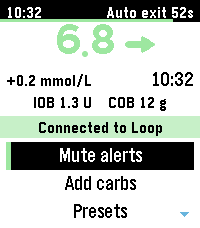
For completeness sake, here is the screenshots of the "Luped Remote" watch side app, that can be optjonally enabled inside the Luped Settings inside Loop. The split is a technical necessity since a normal Pebble watchface cannot do user interaction. This means any remote action such as bolusing, carbs etc needs its own watchside app. Loop will connect to both "Luped CGM" and "Luped Remote" as necessary

Main screen and Mute alerts: Loop's own mute times, and End mute

Main Mute alerts End mute
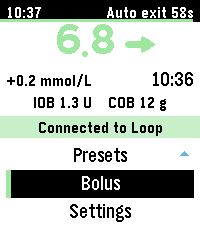
Main screen: glucose, trend, IOB and COB, Connected to Loop, and the action menu Mute alerts: 30 min, 1 hour, 2 hours, 4 hours, End mute Confirm: End the mute of alerts?

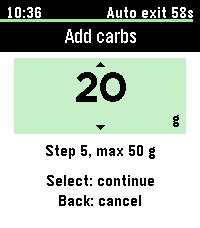
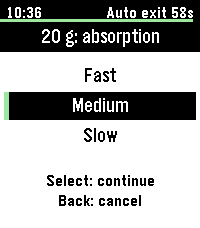
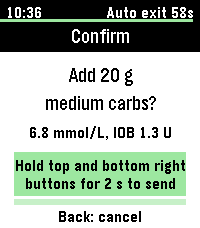
Add carbs: amount, absorption, confirmation

Amount Absorption Confirm
Add carbs picker at 20 g, step 5 g, max 50 g Absorption for 20 g: Fast, Medium, Slow Confirm: Add 20 g medium carbs, with current glucose and IOB

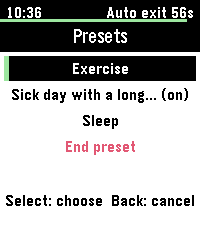
Presets: Loop's override presets, asked for when opened; the running one is marked, long names are shortened

Presets
Presets from Loop: Exercise, Sick day (on), Sleep, End preset

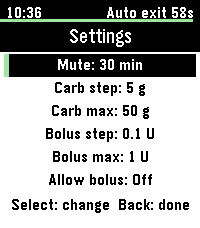
Bolus: off until turned on in the watch's own settings (Loop's Watch Permissions must allow it too)

Watch settings Allow bolus on Bolus in the menu
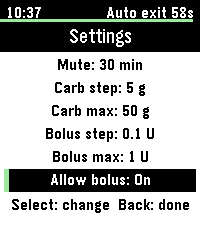
Watch settings: mute, carb and bolus steps and maximums, Allow bolus Off Watch settings with Allow bolus On Main menu with Bolus shown

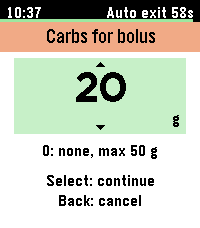
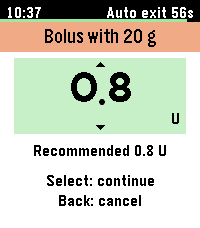
A bolus starts with its carbs (0 for none). The watch then asks Loop for its recommendation for those carbs and starts the picker there. Loop refuses a bolus over its recommendation.

Carbs for bolus Loop's recommendation Confirm
Carbs for bolus: 20 g Bolus with 20 g: picker at 0.8 U, Recommended 0.8 U Confirm: Bolus 0.8 U with 20 g medium carbs, glucose, IOB and the recommendation
Sending Loop's answer
Sending: waiting for the phone Done: the phone carried it out

When Loop refuses (for example a bolus over its recommendation, or no recent glucose), the last screen says "Not done" with Loop's reason.

Bjørn Inge Berg added 2 commits November 6, 2026 11:38
…t restarting the watchface

The plugin asks the watchface whether it has a speaker until it has
reported one, so a watch added again while its watchface kept running
offers Alarm Sound right away.
…aiting reading while Loop is in the background

The plugin holds an iOS background task while a reading waits for the loop
result, so iOS doesn't suspend Loop before it has gone to the watch.
@dabear
dabear marked this pull request as ready for review November 6, 2026 11:23
@dabear

dabear commented Nov 6, 2026 •

Copy link
Copy Markdown
Author

went back to draft on 5 Nov while I added remote options; these a are done:

  • Luped Remote:
    • Loop's presets to start or end;
    • Loop's own mute times, plus End mute;
    • a bolus that starts at Loop's recommendation for the carbs that go with it, including their absorption.
  • Turning remote actions off : empty remoteCapabilities in the plugin. Loop then hides Watch Permissions, and the plugin hides Luped Remote and never opens its watch session.
  • Watch Permissions now sit under a Third-Party Smartwatch header, starting with what a watch other than Apple Watch can do.
  • Find My Pebble, and Alarm Sound for watches with a speaker. Alarm Sound shows without restarting the watchface.
  • A reading waiting for the loop result reaches the watch even when iOS would suspend Loop in the background.

next-dev (3aeff3b) is merged in, and all three PRs are mergeable.

On a Pebble Time 2, checked on the phone: presets started and ended from the watch, a 30-minute mute and End mute from the watch, a bolus with carbs from the watch, and Alarm Sound appearing after the watch was added again. The description and screenshots are also updated.

Ready for review @ps2

Sign up for free to join this conversation on GitHub. Already have an account? Sign in to comment

Labels

None yet

Projects

None yet

Development

Successfully merging this pull request may close these issues.

1 participant